---
title: Why is my job posting paused?
description: What the Paused status means and how to resume your job.
---
[Skip to content](https://knowledge.avahr.com/why-is-my-job-posting-paused#main-content)
English
Show submenu for translations

- [Tickets](https://23869753.hs-sites.com/tickets-view)
- [Sign out](https://23869753.hs-sites.com/_hcms/mem/logout)
Open main navigation
Close main navigation
- [Tickets](https://23869753.hs-sites.com/tickets-view)
- [Sign out](https://23869753.hs-sites.com/_hcms/mem/logout)
- English
Show submenu for translations
- [Go to avahr.com](https://avahr.com/)
[Go to avahr.com](https://avahr.com/)
Hello. How can we help you?
- There are no suggestions because the search field is empty.
1. [Help Center](https://knowledge.avahr.com/?hsLang=en)
2. [Frequently Asked Questions](https://knowledge.avahr.com/frequently-asked-questions?hsLang=en)
# Why is my job posting paused?
## What the Paused status means and how to resume your job.
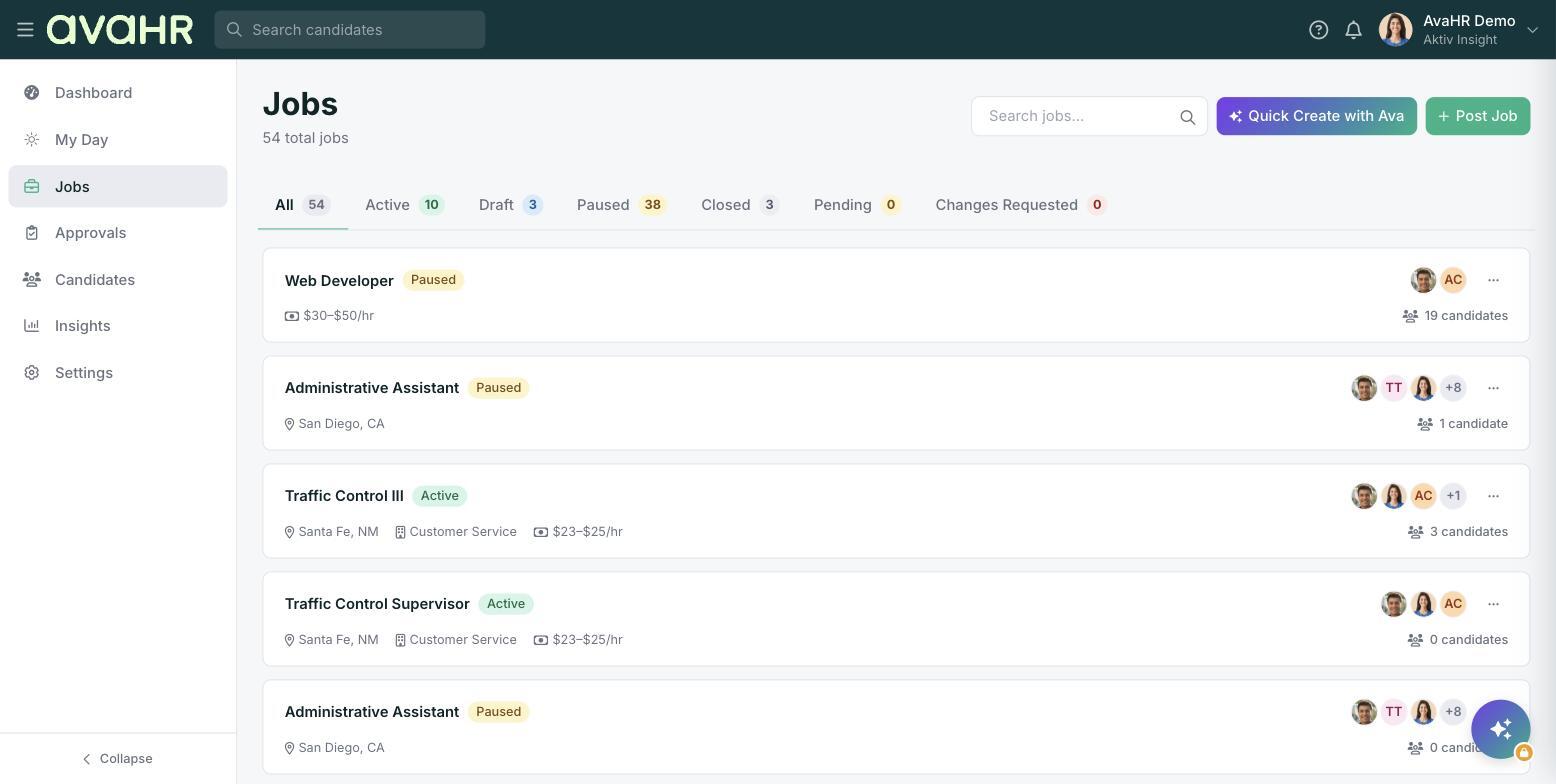
If a job shows a **Paused** status pill on the **Jobs** list, it is not currently out on the job boards. Here is why that happens and how to fix it.
### Common reasons
- **Someone paused it.** A member of your team paused the job, for example while making changes.
- **It is pending review.** The job may be waiting on internal approval before it goes live.
- **There is a billing issue.** A payment or subscription problem can pause a job until it is resolved.
### Resume the job
Once whatever caused the pause is sorted out, open the job's three-dot menu on the **Jobs** list and click **Resume Job**. The status returns to Active and the job goes back out to the boards.
If you are not sure why a job paused, or a billing issue is holding it up, check **Settings \> Billing** or reach out to our support team.
- [Getting Started](https://knowledge.avahr.com/getting-started?hsLang=en)
- [Frequently Asked Questions](https://knowledge.avahr.com/frequently-asked-questions?hsLang=en)
- [Policies](https://knowledge.avahr.com/policies?hsLang=en)
- [Account Settings](https://knowledge.avahr.com/account-settings?hsLang=en)
- [Managing Candidates](https://knowledge.avahr.com/managing-candidates?hsLang=en#main-content)
- [Offers](https://knowledge.avahr.com/managing-candidates?hsLang=en#offers)
- [Manage Job Postings](https://knowledge.avahr.com/manage-job-postings?hsLang=en)
- [Team Collaboration](https://knowledge.avahr.com/team-collaboration?hsLang=en)
- [Insights](https://knowledge.avahr.com/insights?hsLang=en)
- [Integrations & Partners](https://knowledge.avahr.com/integrations-partners?hsLang=en)
- [WordPress Plugin](https://knowledge.avahr.com/wordpress-plugin?hsLang=en)
- [Messaging](https://knowledge.avahr.com/messaging?hsLang=en#main-content)
- [Templates](https://knowledge.avahr.com/messaging?hsLang=en#templates)
- [Recruiting](https://knowledge.avahr.com/recruiting?hsLang=en#main-content)
- [Screening](https://knowledge.avahr.com/recruiting?hsLang=en#screening)
[.png?width=117&height=24&name=AVA%20HR%20Logo%20(4).png "Chill listening crop-3")](http://vivahr.com)
Help Center
[mailto:email@email.com](mailto:email@email.com)
Copyright © 2026, AvaHR