---
title: What is AI Candidate Scoring?
description: The Ava Score is a match-confidence read on how well a candidate fits the role. A second opinion.
---
[Skip to content](https://knowledge.avahr.com/what-is-ai-candidate-scoring#main-content)
English
Show submenu for translations

- [Tickets](https://23869753.hs-sites.com/tickets-view)
- [Sign out](https://23869753.hs-sites.com/_hcms/mem/logout)
Open main navigation
Close main navigation
- [Tickets](https://23869753.hs-sites.com/tickets-view)
- [Sign out](https://23869753.hs-sites.com/_hcms/mem/logout)
- English
Show submenu for translations
- [Go to avahr.com](https://avahr.com/)
[Go to avahr.com](https://avahr.com/)
Hello. How can we help you?
- There are no suggestions because the search field is empty.
1. [Help Center](https://knowledge.avahr.com/?hsLang=en)
2. [Managing Candidates](https://knowledge.avahr.com/managing-candidates?hsLang=en)
# What is AI Candidate Scoring?
## The Ava Score is a match-confidence read on how well a candidate fits the role. A second opinion.
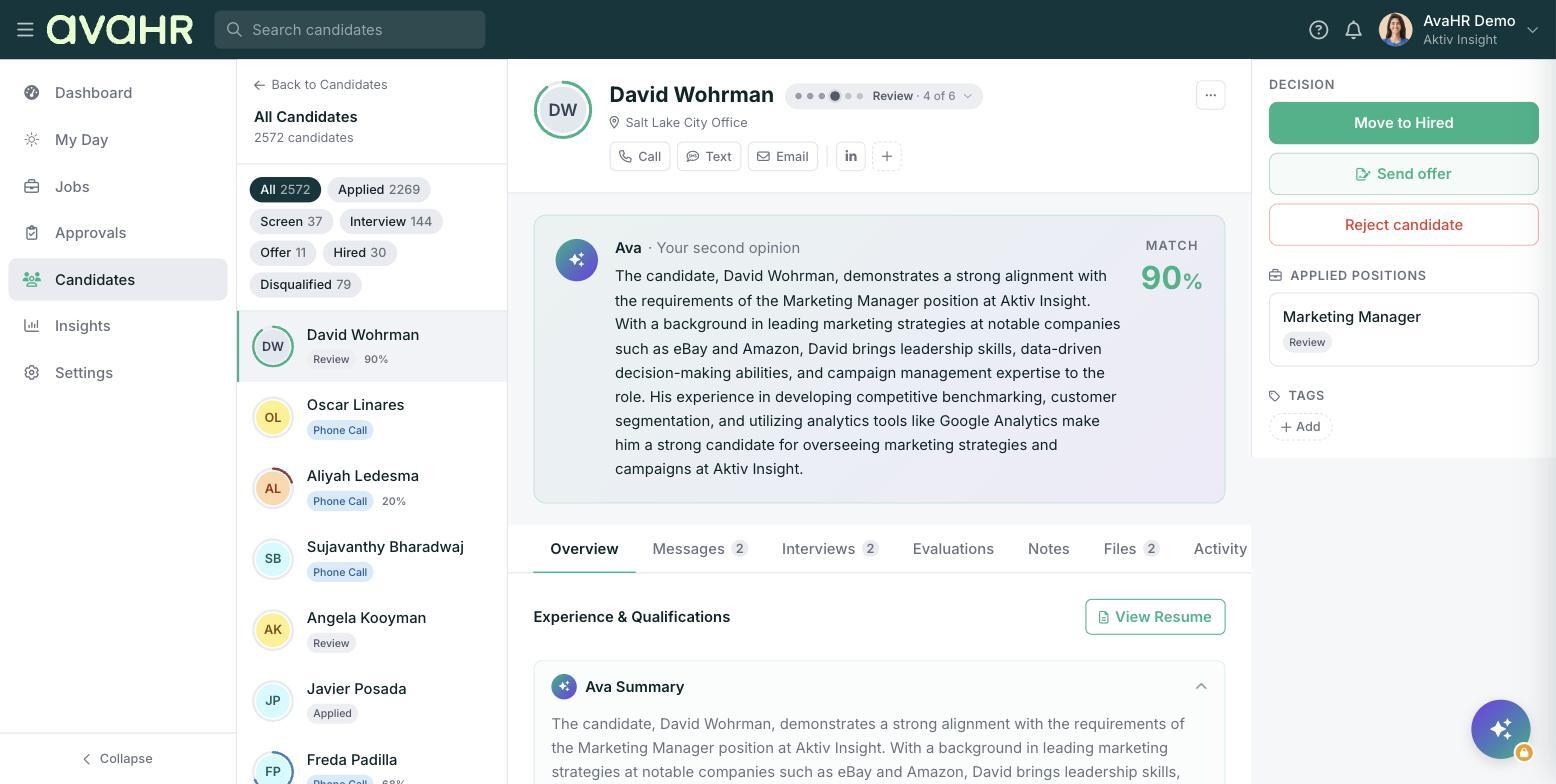
The "Ava Score" is a quick read on how well a candidate fits the job they applied to. It shows Ava's match confidence based on the candidate's skills, experience, and culture alignment for that role. Think of it as a second opinion that helps you prioritize who to look at first. It is not an automatic decision, and it never moves or rejects anyone on its own.
### Where you will see it
- In the candidates list, as a colored percentage in the "Ava Score" column. The column tooltip reads: "Ava's match confidence, how well this candidate fits the role based on skills, experience, and culture alignment."
- As the colored ring around each candidate's avatar, so you can scan strong fits at a glance.
- On the candidate profile, in the "Ava · Your second opinion" card, with a plain-language summary and a "Match" percentage.
### Seeing the reasoning
Open a candidate and find the "Ava · Your second opinion" card. Click "Show my reasoning" to expand Ava's explanation, including a "Strengths" list and a "Risks" list. This is where the score becomes useful, because it tells you what stood out and what to double-check before you reach out.
### If there is no score yet
A candidate who has not been scored shows a dash instead of a percentage. That usually just means Ava has not finished, or there is not enough information yet. It is not a low score.
### How to use it well
- Use the score to decide who to review first, not who to hire.
- Always read the "Strengths" and "Risks" before acting. A strong candidate can have a real risk worth a quick question.
- Do not skip lower-scored candidates automatically. The score reflects fit for one role, and people are more than their resume.
**Good to know:** The Ava Score is a guide for you and your team. You always make the final call using the profile, interviews, and your own judgment.
- [Getting Started](https://knowledge.avahr.com/getting-started?hsLang=en)
- [Frequently Asked Questions](https://knowledge.avahr.com/frequently-asked-questions?hsLang=en)
- [Policies](https://knowledge.avahr.com/policies?hsLang=en)
- [Account Settings](https://knowledge.avahr.com/account-settings?hsLang=en)
- [Managing Candidates](https://knowledge.avahr.com/managing-candidates?hsLang=en#main-content)
- [Offers](https://knowledge.avahr.com/managing-candidates?hsLang=en#offers)
- [Manage Job Postings](https://knowledge.avahr.com/manage-job-postings?hsLang=en)
- [Team Collaboration](https://knowledge.avahr.com/team-collaboration?hsLang=en)
- [Insights](https://knowledge.avahr.com/insights?hsLang=en)
- [Integrations & Partners](https://knowledge.avahr.com/integrations-partners?hsLang=en)
- [WordPress Plugin](https://knowledge.avahr.com/wordpress-plugin?hsLang=en)
- [Messaging](https://knowledge.avahr.com/messaging?hsLang=en#main-content)
- [Templates](https://knowledge.avahr.com/messaging?hsLang=en#templates)
- [Recruiting](https://knowledge.avahr.com/recruiting?hsLang=en#main-content)
- [Screening](https://knowledge.avahr.com/recruiting?hsLang=en#screening)
[.png?width=117&height=24&name=AVA%20HR%20Logo%20(4).png "Chill listening crop-3")](http://vivahr.com)
Help Center
[mailto:email@email.com](mailto:email@email.com)
Copyright © 2026, AvaHR