---
title: Manage Notifications
description: Choose which candidate and hiring updates land in your inbox.
---
[Skip to content](https://knowledge.avahr.com/manage-notifications#main-content)
English
Show submenu for translations

- [Tickets](https://23869753.hs-sites.com/tickets-view)
- [Sign out](https://23869753.hs-sites.com/_hcms/mem/logout)
Open main navigation
Close main navigation
- [Tickets](https://23869753.hs-sites.com/tickets-view)
- [Sign out](https://23869753.hs-sites.com/_hcms/mem/logout)
- English
Show submenu for translations
- [Go to avahr.com](https://avahr.com/)
[Go to avahr.com](https://avahr.com/)
Hello. How can we help you?
- There are no suggestions because the search field is empty.
1. [Help Center](https://knowledge.avahr.com/?hsLang=en)
2. [Messaging](https://knowledge.avahr.com/messaging?hsLang=en)
# Manage Notifications
## Choose which candidate and hiring updates land in your inbox.
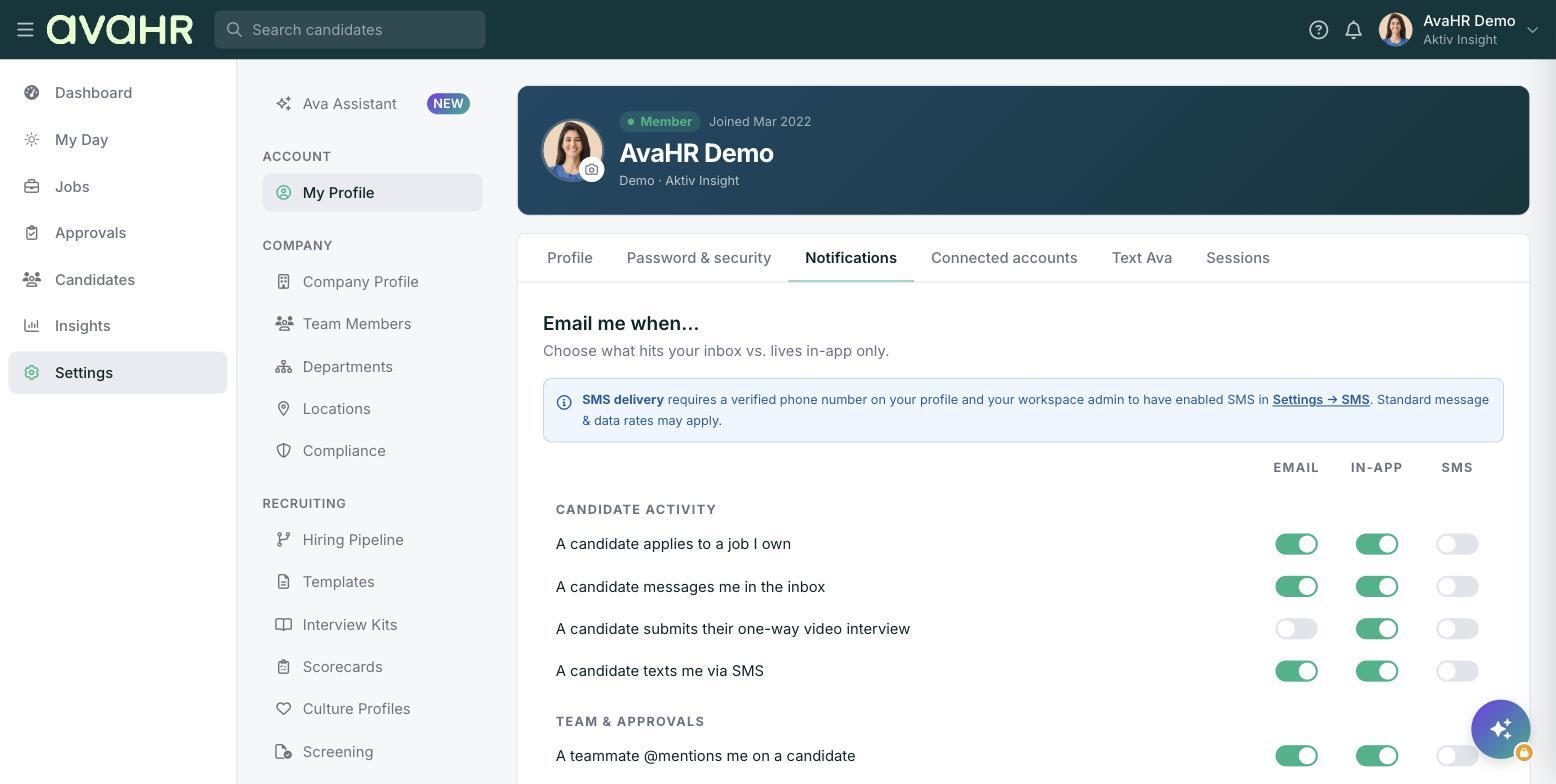
Notifications keep you in the loop on what is happening with your candidates without you having to check the app all day. You decide which updates you want, so your inbox stays useful instead of noisy.
### Where to manage them
Go to **Settings**, then **My Profile** under ACCOUNT. Your notification preferences live here alongside the rest of your personal settings.
### What you can be notified about
You can turn on notifications for the moments that matter most in hiring, such as:
- A new candidate applies to one of your jobs.
- A candidate completes a questionnaire.
- A candidate replies to your email or text.
Turn on the updates you care about and leave the rest off. If several people help with hiring, it is common for each person to keep only the notifications tied to their part of the process.
### Save your choices
Adjust your preferences in **My Profile** and save. Your changes apply to your account only, so everyone on the team can set notifications the way that works for them.
- [Getting Started](https://knowledge.avahr.com/getting-started?hsLang=en)
- [Frequently Asked Questions](https://knowledge.avahr.com/frequently-asked-questions?hsLang=en)
- [Policies](https://knowledge.avahr.com/policies?hsLang=en)
- [Account Settings](https://knowledge.avahr.com/account-settings?hsLang=en)
- [Managing Candidates](https://knowledge.avahr.com/managing-candidates?hsLang=en#main-content)
- [Offers](https://knowledge.avahr.com/managing-candidates?hsLang=en#offers)
- [Manage Job Postings](https://knowledge.avahr.com/manage-job-postings?hsLang=en)
- [Team Collaboration](https://knowledge.avahr.com/team-collaboration?hsLang=en)
- [Insights](https://knowledge.avahr.com/insights?hsLang=en)
- [Integrations & Partners](https://knowledge.avahr.com/integrations-partners?hsLang=en)
- [WordPress Plugin](https://knowledge.avahr.com/wordpress-plugin?hsLang=en)
- [Messaging](https://knowledge.avahr.com/messaging?hsLang=en#main-content)
- [Templates](https://knowledge.avahr.com/messaging?hsLang=en#templates)
- [Recruiting](https://knowledge.avahr.com/recruiting?hsLang=en#main-content)
- [Screening](https://knowledge.avahr.com/recruiting?hsLang=en#screening)
[.png?width=117&height=24&name=AVA%20HR%20Logo%20(4).png "Chill listening crop-3")](http://vivahr.com)
Help Center
[mailto:email@email.com](mailto:email@email.com)
Copyright © 2026, AvaHR