---
title: How to Connect the LinkedIn Integration
description: Add your LinkedIn Company ID in AvaHR to post your active jobs to LinkedIn.
---
[Skip to content](https://knowledge.avahr.com/linkedin-integration#main-content)
English
Show submenu for translations

- [Tickets](https://23869753.hs-sites.com/tickets-view)
- [Sign out](https://23869753.hs-sites.com/_hcms/mem/logout)
Open main navigation
Close main navigation
- [Tickets](https://23869753.hs-sites.com/tickets-view)
- [Sign out](https://23869753.hs-sites.com/_hcms/mem/logout)
- English
Show submenu for translations
- [Go to avahr.com](https://avahr.com/)
[Go to avahr.com](https://avahr.com/)
Hello. How can we help you?
- There are no suggestions because the search field is empty.
1. [Help Center](https://knowledge.avahr.com/?hsLang=en)
2. [Integrations & Partners](https://knowledge.avahr.com/integrations-partners?hsLang=en)
# How to Connect the LinkedIn Integration
## Add your LinkedIn Company ID in AvaHR to post your active jobs to LinkedIn.
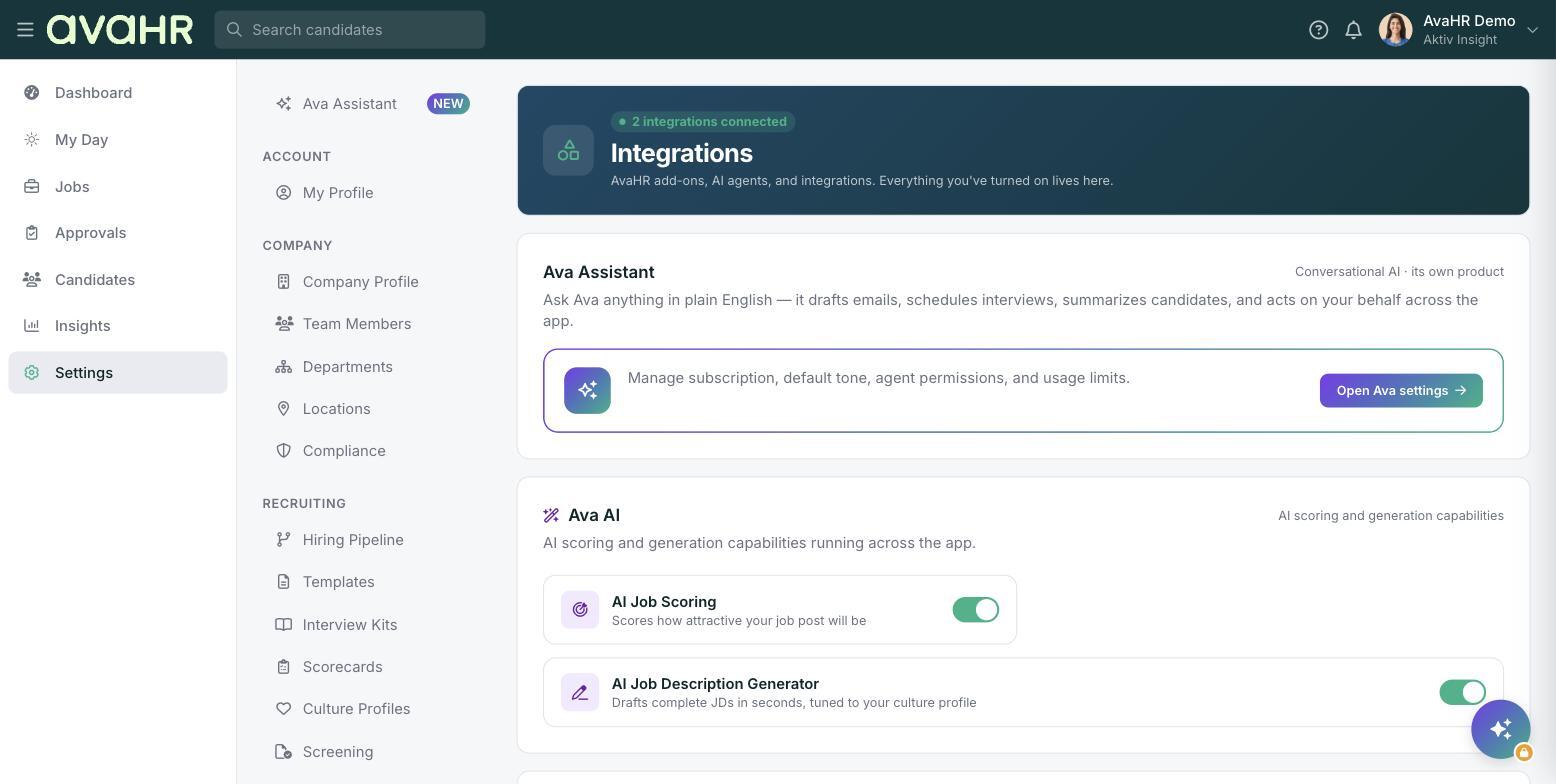
If you want your active jobs to appear on LinkedIn, you can connect your LinkedIn account in your AvaHR settings. You will need your LinkedIn Company ID to do this.
## Find your LinkedIn Company ID
You can find your Company ID by following the instructions listed [here](https://www.linkedin.com/help/linkedin/answer/a415420). Your LinkedIn Company ID is the numeric value that appears after **f\_C=** and before **&** in the URL.
## Connect LinkedIn in AvaHR
1. Go to your account **Settings**.
2. Select **Integrations**.
3. Find the LinkedIn integration.
4. Paste your **LinkedIn Company ID** into the field and select **Submit**.
Once you connect your LinkedIn account, your active jobs should appear on LinkedIn within two business days. Any updates you make to your postings in AvaHR are reflected on LinkedIn within 24 hours.
- [Getting Started](https://knowledge.avahr.com/getting-started?hsLang=en)
- [Frequently Asked Questions](https://knowledge.avahr.com/frequently-asked-questions?hsLang=en)
- [Policies](https://knowledge.avahr.com/policies?hsLang=en)
- [Account Settings](https://knowledge.avahr.com/account-settings?hsLang=en)
- [Managing Candidates](https://knowledge.avahr.com/managing-candidates?hsLang=en#main-content)
- [Offers](https://knowledge.avahr.com/managing-candidates?hsLang=en#offers)
- [Manage Job Postings](https://knowledge.avahr.com/manage-job-postings?hsLang=en)
- [Team Collaboration](https://knowledge.avahr.com/team-collaboration?hsLang=en)
- [Insights](https://knowledge.avahr.com/insights?hsLang=en)
- [Integrations & Partners](https://knowledge.avahr.com/integrations-partners?hsLang=en)
- [WordPress Plugin](https://knowledge.avahr.com/wordpress-plugin?hsLang=en)
- [Messaging](https://knowledge.avahr.com/messaging?hsLang=en#main-content)
- [Templates](https://knowledge.avahr.com/messaging?hsLang=en#templates)
- [Recruiting](https://knowledge.avahr.com/recruiting?hsLang=en#main-content)
- [Screening](https://knowledge.avahr.com/recruiting?hsLang=en#screening)
[.png?width=117&height=24&name=AVA%20HR%20Logo%20(4).png "Chill listening crop-3")](http://vivahr.com)
Help Center
[mailto:email@email.com](mailto:email@email.com)
Copyright © 2026, AvaHR