
Posting a job in AvaHR takes just a few minutes, and your role can go live on your careers page and the free job boards right away. This guide walks you through the whole flow, from opening the wizard to publishing.
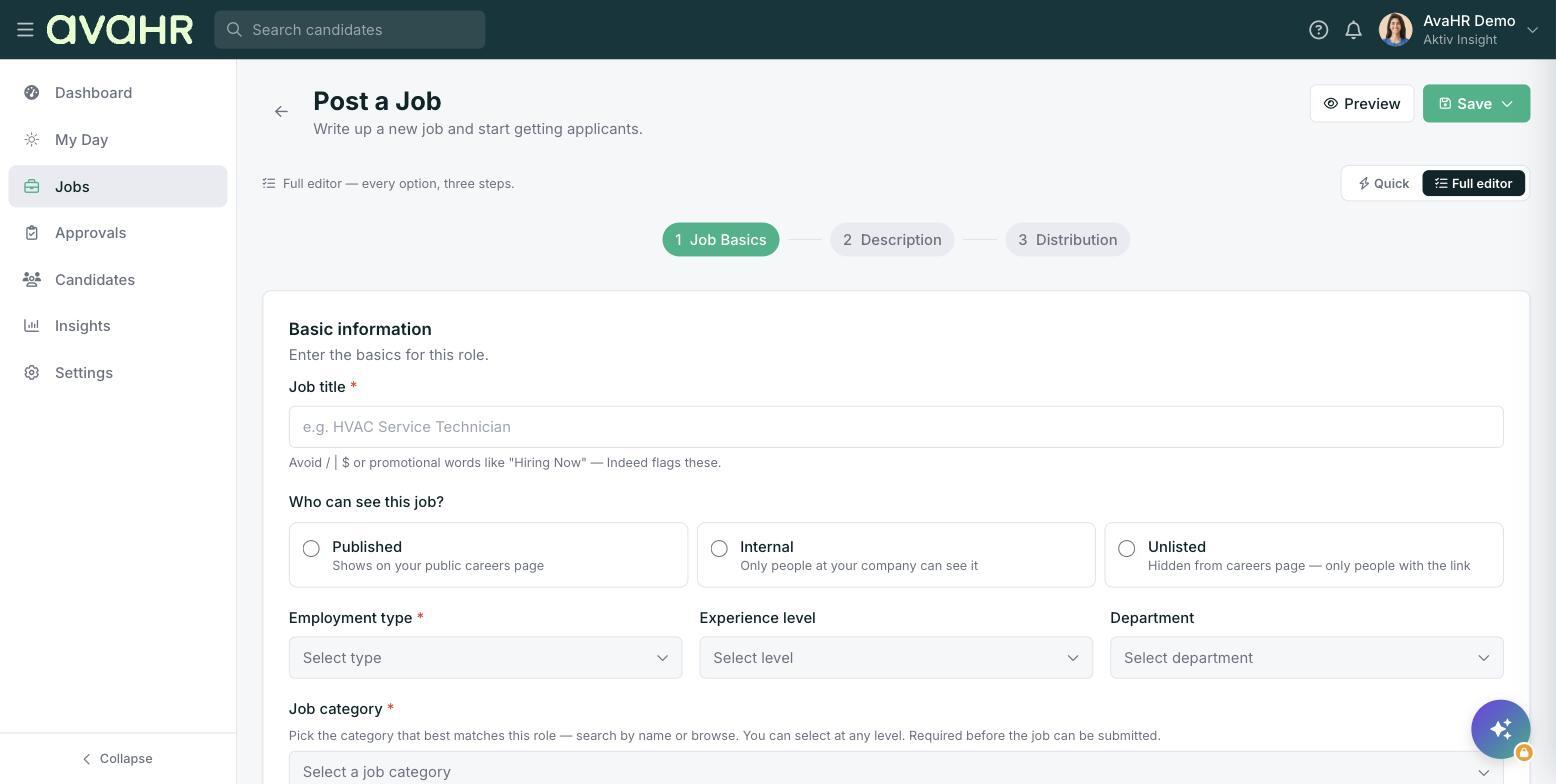
Start a new job
- In the left sidebar, click Jobs.
- At the top right, click Post Job. If you would rather let Ava do the heavy lifting, click Quick Create with Ava instead.
- Choose Quick for a single fast page, or Full editor for the full 3-step wizard. This guide covers the full editor.
Step 1: Job basics
Fill in the core details of the role.
- Job title (required). Use a common, searchable title like "HVAC Technician". Avoid symbols like / | $ and phrases like "Hiring Now", and keep it under 60 characters.
- Who can see this job? Pick Published (public careers page), Internal (only your company), or Unlisted (hidden, reachable by direct link only).
- Employment type (required) and Experience level.
- Department and Job category (required, searchable).
- Where is this job? (required): On-site, Hybrid, Remote, or On the road. On-site and Hybrid also ask for an Office location.
- Salary: choose the type (Annual, Hourly, Monthly, or Project-based), then enter a Minimum and Maximum. Adding pay tends to improve performance on some boards.
- Hiring pipeline: your account default is preselected. Leave it or pick another.
- What applicants submit: set each field (Resume/CV, Cover letter, Phone number, Address, LinkedIn URL, Portfolio URL, Website URL) to Required, Optional, or Off. Resume/CV defaults to Required.
Click Next when you are done.
Step 2: Description
Write the body of the posting in the rich-text editor. A few tips for a strong description:
- Break it into sections like Overview, Responsibilities, and Requirements.
- Use short paragraphs and bullet points so it is easy to scan.
- Advertise one role at a time, and avoid targeting any demographic.
Short on time? Click Generate with AI to have Ava draft the description for you. You can also add a Culture profile to show what it is like to work at your company, and attach a Screening questionnaire to ask applicants a few qualifying questions. Click Next to continue.
Step 3: Distribution
Choose where your job goes.
- Free job boards is on by default and posts your job to 50+ boards at no cost.
- Ava Select Boost ($99 one-time) gives you featured placement for 30 days.
- You can also add individual Paid job boards like Glassdoor or ZipRecruiter, each running 30 days.
Check the Boost Summary for your total, and enter a Promo code if you have one.
Publish
When everything looks right, click Post Job. If your role needs sign-off, you will see Submit for Approval instead, and it will go to an approver on your team.
You can also save and finish later. Use the Save dropdown at the top right to choose Save as Draft or Save as Template, and use Preview to see the public posting first.
Tips
- New to AvaHR? Your first posting may take up to 24 hours to clear a quick quality review before it goes live.
- Not sure whether to use Quick or Full editor? Quick asks only the essentials and fills the rest from your account defaults, which is great for a fast repost. Use the Full editor when you want full control.