
You can pause a job when you want a break from new applications, or close it once the role is filled. Both are done from the Jobs page.
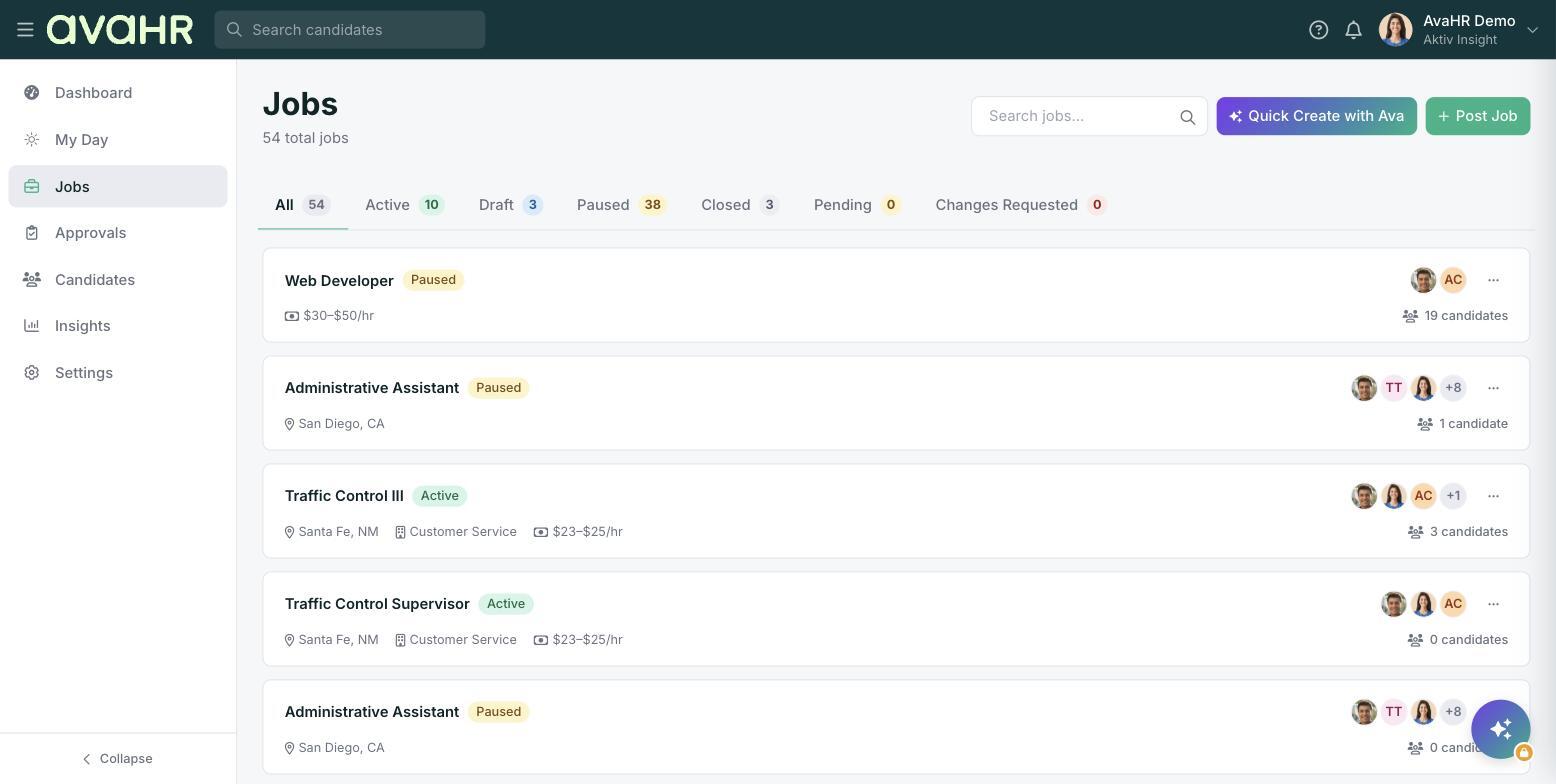
Steps
- Open Jobs from the left sidebar.
- Find the job you want to change and click the three-dot menu on the right of the row.
- Choose Pause Job or Close Job.
Pausing a job
Pausing temporarily hides the job from applicants. It comes off your careers page and the job boards while it is paused, so no new applications come in. Its status pill shows Paused. You can bring it back anytime by opening the three-dot menu and choosing Resume Job. This is handy when you have plenty of applicants already or just need to focus elsewhere for a while.
Closing a job
Closing marks the role as filled or no longer available and stops showing it to applicants. Its status pill shows Closed. Closing signals that hiring for that position is done.
Finding paused or closed jobs
Once a job is paused or closed it is no longer active. To see it again, use the status tabs at the top of the Jobs page and select Paused or Closed. All of the job details and candidates stay attached.