---
title: "Hiring Insights: Position Overview"
description: Track how individual jobs are performing from the redesigned Insights page.
---
[Skip to content](https://knowledge.avahr.com/hiring-insights-position-overview#main-content)
English
Show submenu for translations

- [Tickets](https://23869753.hs-sites.com/tickets-view)
- [Sign out](https://23869753.hs-sites.com/_hcms/mem/logout)
Open main navigation
Close main navigation
- [Tickets](https://23869753.hs-sites.com/tickets-view)
- [Sign out](https://23869753.hs-sites.com/_hcms/mem/logout)
- English
Show submenu for translations
- [Go to avahr.com](https://avahr.com/)
[Go to avahr.com](https://avahr.com/)
Hello. How can we help you?
- There are no suggestions because the search field is empty.
1. [Help Center](https://knowledge.avahr.com/?hsLang=en)
2. [Insights](https://knowledge.avahr.com/insights?hsLang=en)
# Hiring Insights: Position Overview
## Track how individual jobs are performing from the redesigned Insights page.
Looking for how a single job is performing? That view now lives on the one **Insights** page instead of a separate Position Overview screen. You'll read per-job performance in the same place as the rest of your hiring numbers.
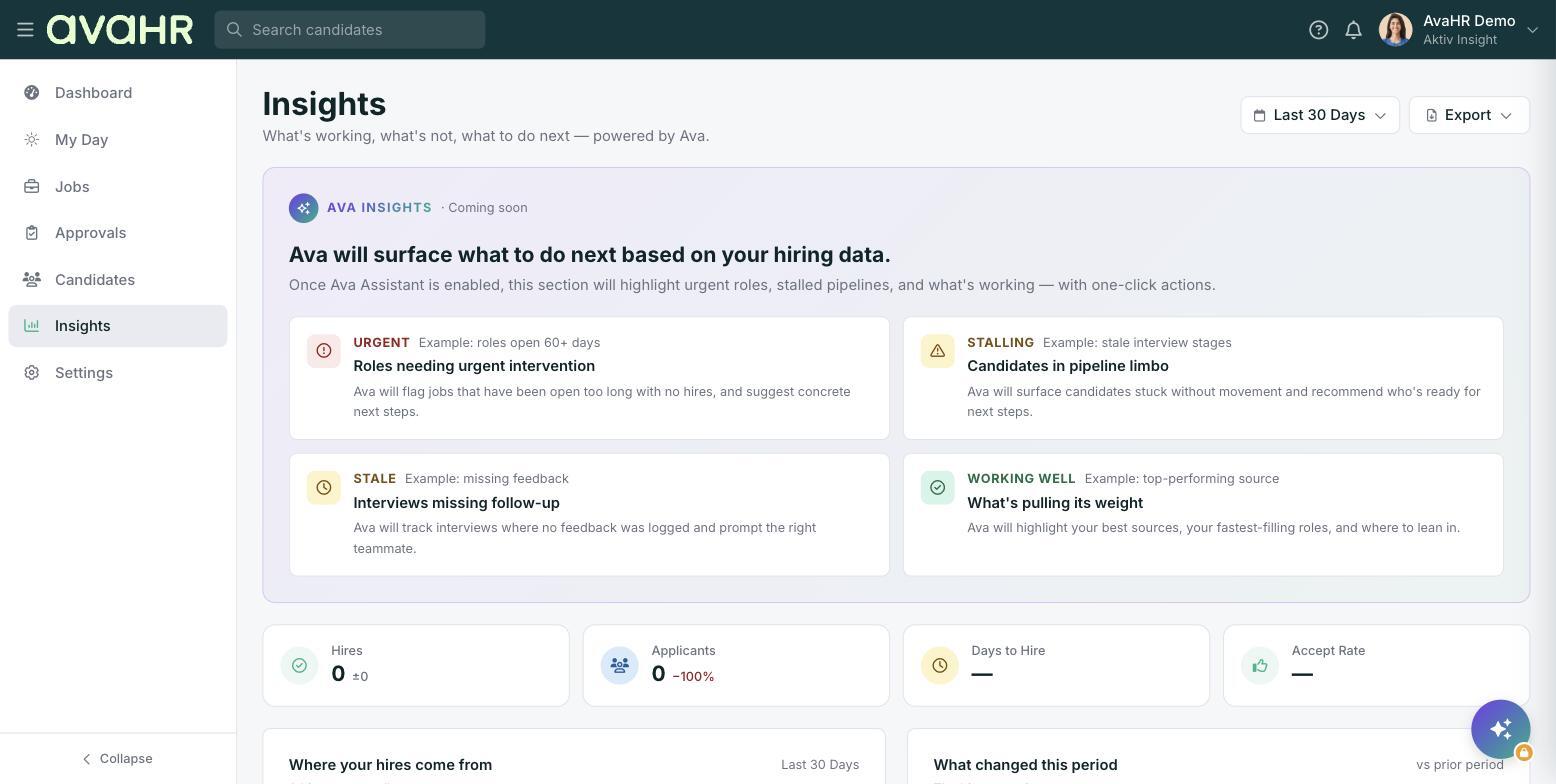
To get there, select **Insights** from the menu on the left.
### Start with the date range and export
At the top of the page, set the date range (it opens on **Last 30 Days**) so you're looking at the right window for the role you care about. Use the **Export** button to pull the numbers out whenever you need them.
### Read performance for your roles
The KPI tiles at the top give you the headline story for your hiring: **Hires**, **Applicants**, **Days to Hire**, and **Accept Rate**. These tell you how quickly roles are filling and how often offers land.
To understand a specific position, use the date range together with these tiles and the sections below. **Where your hires come from** shows which sources are producing hires, and **What changed this period** shows the movement since your last window, so you can tell whether a role is picking up or stalling.
### A note on deeper per-job breakdowns
Some of the deeper, job-by-job breakdowns from the old Position Overview are now part of this same page rather than a standalone report. Use the date range to focus on the period that matters and **Export** to take the detail with you.
### Ava Insights
The **Ava Insights** panel, marked *Coming soon*, will eventually call out roles that need urgent intervention and where things are working well, so struggling positions are easier to spot at a glance.
- [Getting Started](https://knowledge.avahr.com/getting-started?hsLang=en)
- [Frequently Asked Questions](https://knowledge.avahr.com/frequently-asked-questions?hsLang=en)
- [Policies](https://knowledge.avahr.com/policies?hsLang=en)
- [Account Settings](https://knowledge.avahr.com/account-settings?hsLang=en)
- [Managing Candidates](https://knowledge.avahr.com/managing-candidates?hsLang=en#main-content)
- [Offers](https://knowledge.avahr.com/managing-candidates?hsLang=en#offers)
- [Manage Job Postings](https://knowledge.avahr.com/manage-job-postings?hsLang=en)
- [Team Collaboration](https://knowledge.avahr.com/team-collaboration?hsLang=en)
- [Insights](https://knowledge.avahr.com/insights?hsLang=en)
- [Integrations & Partners](https://knowledge.avahr.com/integrations-partners?hsLang=en)
- [WordPress Plugin](https://knowledge.avahr.com/wordpress-plugin?hsLang=en)
- [Messaging](https://knowledge.avahr.com/messaging?hsLang=en#main-content)
- [Templates](https://knowledge.avahr.com/messaging?hsLang=en#templates)
- [Recruiting](https://knowledge.avahr.com/recruiting?hsLang=en#main-content)
- [Screening](https://knowledge.avahr.com/recruiting?hsLang=en#screening)
[.png?width=117&height=24&name=AVA%20HR%20Logo%20(4).png "Chill listening crop-3")](http://vivahr.com)
Help Center
[mailto:email@email.com](mailto:email@email.com)
Copyright © 2026, AvaHR