---
title: Creating a Job Description with AVA
description: Let Ava draft a full job description from a few details, then review and edit before saving.
---
[Skip to content](https://knowledge.avahr.com/creating-a-job-description-with-ava#main-content)
English
Show submenu for translations

- [Tickets](https://23869753.hs-sites.com/tickets-view)
- [Sign out](https://23869753.hs-sites.com/_hcms/mem/logout)
Open main navigation
Close main navigation
- [Tickets](https://23869753.hs-sites.com/tickets-view)
- [Sign out](https://23869753.hs-sites.com/_hcms/mem/logout)
- English
Show submenu for translations
- [Go to avahr.com](https://avahr.com/)
[Go to avahr.com](https://avahr.com/)
Hello. How can we help you?
- There are no suggestions because the search field is empty.
1. [Help Center](https://knowledge.avahr.com/?hsLang=en)
2. [Manage Job Postings](https://knowledge.avahr.com/manage-job-postings?hsLang=en)
# Creating a Job Description with AVA
## Let Ava draft a full job description from a few details, then review and edit before saving.
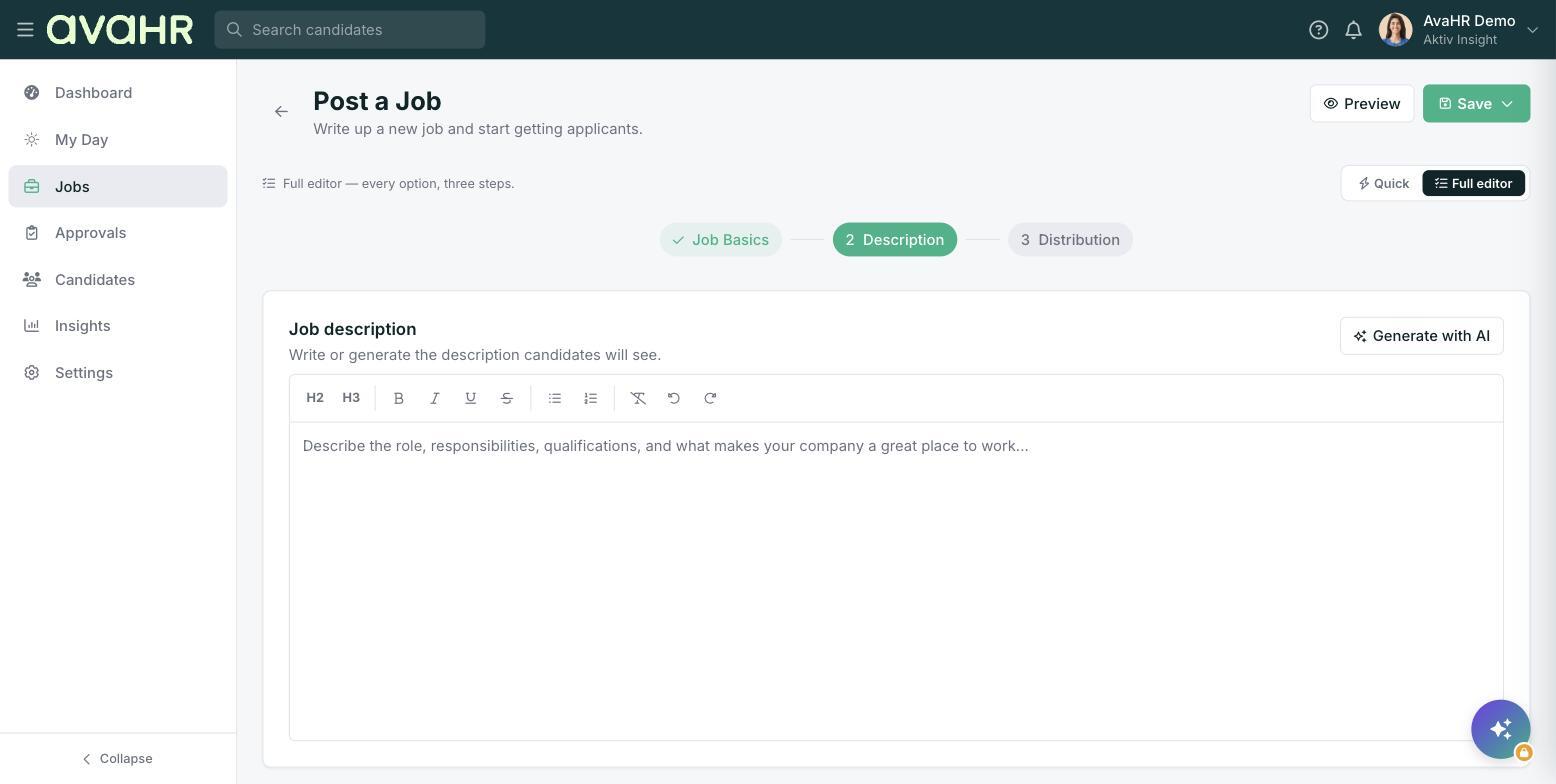
Staring at a blank job description? Ava, the built-in AI writer, can draft one for you from a few basic details. You review and edit before anything is saved, so you stay in control of the final wording.
### Where to find it
Ava writes descriptions right inside the job you are creating.
- In the **Full editor**, go to **Step 2: Description** and click **Generate with AI**.
- In **Quick** mode, click **Have Ava write it** under the short description.
### Generate a description
1. Click **Generate with AI** (or **Have Ava write it**) to open the **Generate with AI** popup.
2. Optionally fill in **Describe the role** with a sentence or two about the position.
3. Optionally add **Key requirements**, like licenses, tools, or years of experience.
4. Pick a **Tone**: Professional, Friendly, Casual, Formal, or Enthusiastic.
5. Click **Generate**. It takes about 10 to 20 seconds.
In the Full editor, the draft fills the rich-text editor. In Quick mode, you see a preview first. Either way, read it over and edit anything before you save or continue.
### Tips
- The more you put in **Describe the role** and **Key requirements**, the more tailored the draft. A little detail goes a long way.
- Always give the draft a quick human pass. Ava gets you 90% of the way, but you know the role and your team best.
### Mini-FAQ
**The Generate with AI button is locked. Why?** The AI writer is an add-on. If it is off, an admin can turn it on under **Settings \> Integrations**.
**Can I run it again?** Yes. Adjust your inputs or tone and generate again until it feels right.
- [Getting Started](https://knowledge.avahr.com/getting-started?hsLang=en)
- [Frequently Asked Questions](https://knowledge.avahr.com/frequently-asked-questions?hsLang=en)
- [Policies](https://knowledge.avahr.com/policies?hsLang=en)
- [Account Settings](https://knowledge.avahr.com/account-settings?hsLang=en)
- [Managing Candidates](https://knowledge.avahr.com/managing-candidates?hsLang=en#main-content)
- [Offers](https://knowledge.avahr.com/managing-candidates?hsLang=en#offers)
- [Manage Job Postings](https://knowledge.avahr.com/manage-job-postings?hsLang=en)
- [Team Collaboration](https://knowledge.avahr.com/team-collaboration?hsLang=en)
- [Insights](https://knowledge.avahr.com/insights?hsLang=en)
- [Integrations & Partners](https://knowledge.avahr.com/integrations-partners?hsLang=en)
- [WordPress Plugin](https://knowledge.avahr.com/wordpress-plugin?hsLang=en)
- [Messaging](https://knowledge.avahr.com/messaging?hsLang=en#main-content)
- [Templates](https://knowledge.avahr.com/messaging?hsLang=en#templates)
- [Recruiting](https://knowledge.avahr.com/recruiting?hsLang=en#main-content)
- [Screening](https://knowledge.avahr.com/recruiting?hsLang=en#screening)
[.png?width=117&height=24&name=AVA%20HR%20Logo%20(4).png "Chill listening crop-3")](http://vivahr.com)
Help Center
[mailto:email@email.com](mailto:email@email.com)
Copyright © 2026, AvaHR