
AvaHR keeps the records you need to stay compliant without adding extra work to your day. From one page you can collect voluntary demographic data, control the reasons your team gives when they reject someone, and export your audit trail and EEO data whenever you need it.
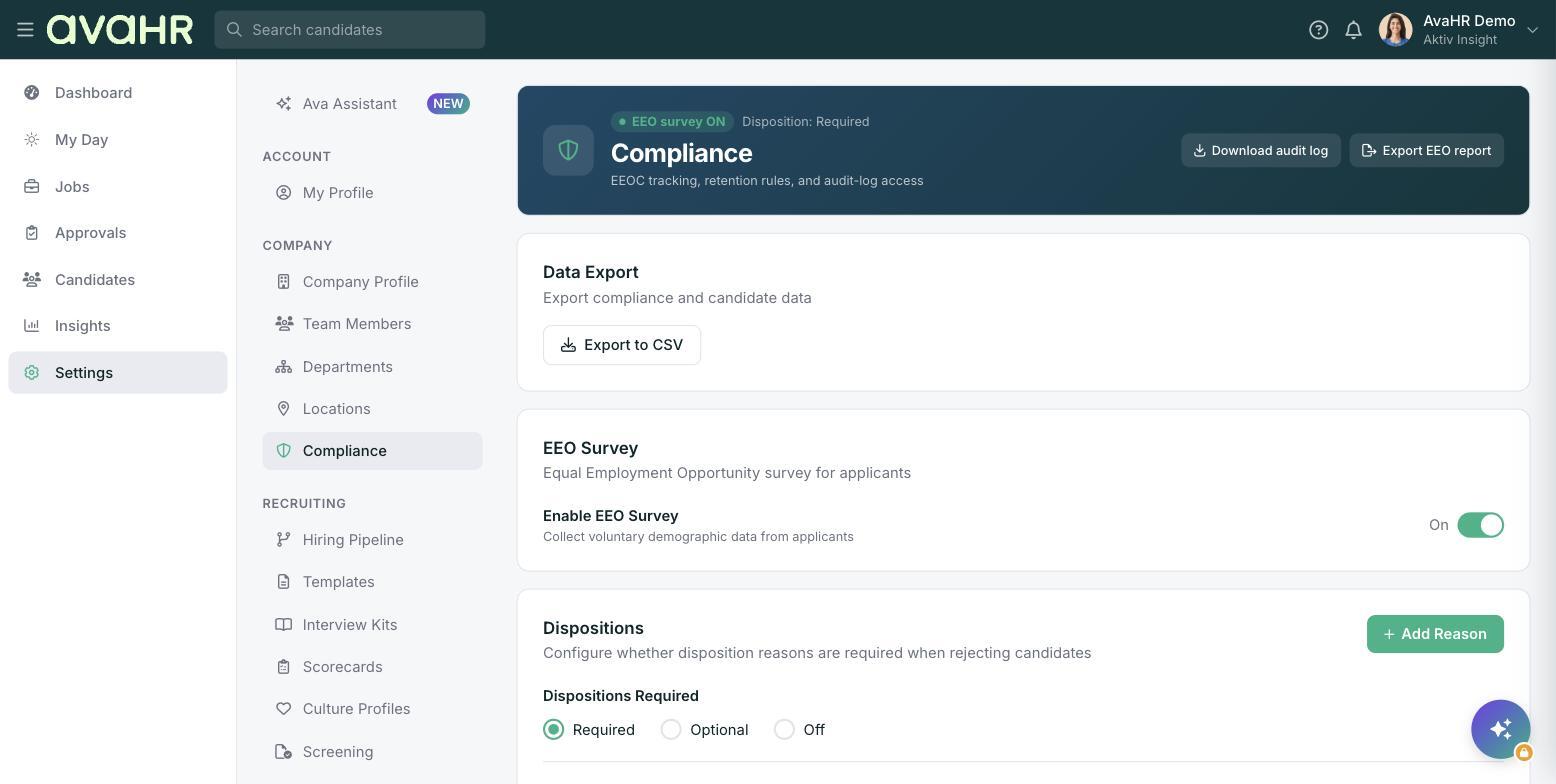
You will find everything under Settings > Compliance. The page is titled "Compliance" and covers EEOC tracking, retention rules, and audit-log access.
Turn on the EEO survey
The EEO survey lets applicants voluntarily share demographic information. It is optional for them and kept separate from hiring decisions.
- Go to Settings > Compliance.
- Find the "EEO Survey" card.
- Switch on Enable EEO Survey to start collecting voluntary demographic data from applicants.
Once it is on, applicants are invited to complete the survey when they apply. Their answers feed the EEO report you can export later.
Set your disposition reasons
A disposition reason is the reason your team records when they reject or disqualify a candidate. This is why the reject dialog asks your team to pick a reason. Managing these reasons keeps your records consistent and supports EEOC reporting.
On the "Dispositions" card you decide how strict this is with the Dispositions Required setting:
- Required: your team must choose a reason every time they reject a candidate.
- Optional: a reason can be added but is not enforced.
- Off: no reason is requested.
Use Add Reason to manage the list of reasons your team can choose from, so the options match how you actually hire.
Download and export your records
The Compliance page gives you a few one-click exports:
- Download audit log: get a record of key actions taken in your account.
- Export EEO report: download your EEO reporting data, including responses collected through the EEO survey.
- Export to CSV: from the "Data Export" card, export your compliance and candidate data as a CSV file.
Tip
If you want clean, comparable reporting, set Dispositions Required to Required and trim your reason list with Add Reason so everyone picks from the same clear set of reasons.
Mini-FAQ
Why does rejecting a candidate ask for a reason? Because your Dispositions setting is set to Required or Optional. You control this on the Compliance page.
Is the EEO survey mandatory for applicants? No. It collects voluntary demographic data, so applicants choose whether to answer.